Best eGPU Setup for AI Inference in 2026
Updated: August 14, 2026
What is an eGPU, and does it work for AI? An external GPU enclosure lets you attach a desktop graphics card to a laptop or compact computer, and for AI inference the concept holds up: once model weights are loaded into the card's VRAM, token generation is compute-bound, not link-bound. The catches are bandwidth during model loading, software compatibility, and cost.
Verdict: Best overall eGPU GPU for AI: RTX 4090 — most tracked performance in an enclosure, with 24 GB of VRAM at a $1,599 MSRP. Best for CUDA on a budget: RTX 4060 Ti 16 GB. Best alternative to eGPUs entirely: a compact system with OCuLink or unified memory.

What is an eGPU and who is it for?
An eGPU is a desktop graphics card installed in an external enclosure that connects to a laptop, mini PC, or small-form-factor desktop over a single cable. It exists for people who need a portable machine during the day and desktop-class AI performance at a desk.
eGPU setups make sense for AI practitioners whose work is mostly inference — running LLMs, generating images, transcribing audio. They make less sense for training or fine-tuning, where the external link slows the frequent data exchanges that training requires, and for 24/7 serving, where a dedicated desktop or workstation is cheaper per hour of use.
How much bandwidth does an eGPU connection have?
An eGPU link over Thunderbolt 3 or USB4 carries only a small fraction of the data a card's native PCIe x16 slot provides, because the external cable presents a much narrower PCIe path to the card. That is the single most important hardware fact about eGPUs.
Our product database does not track enclosure or interface bandwidth figures, so we deliberately do not quote exact throughput numbers here. What matters qualitatively: the link is narrow, model loading is the phase where you feel it most, and steady-state inference is largely unaffected because generation happens inside VRAM.
Does the bandwidth penalty hurt AI inference speed?
For single-stream LLM inference, the penalty is small: prompts and generated tokens are tiny compared to model weights, and the weights sit in VRAM after loading. Model loading is where the narrow link is most visible, and training or fine-tuning suffers the most because gradients and parameters cross the link repeatedly.
- LLM inference: after weights load, tokens are generated mostly inside the GPU; the link carries only the prompt in and tokens out.
- Image generation: more host-to-device traffic than text inference, so expect a somewhat larger penalty.
- Fine-tuning and training: heavily dependent on link throughput; an internal slot or a desktop build is the better tool.
- Model loading: every cold start copies the full model across the link; large models take noticeably longer to become ready.
Which GPU should you put in an eGPU for AI?
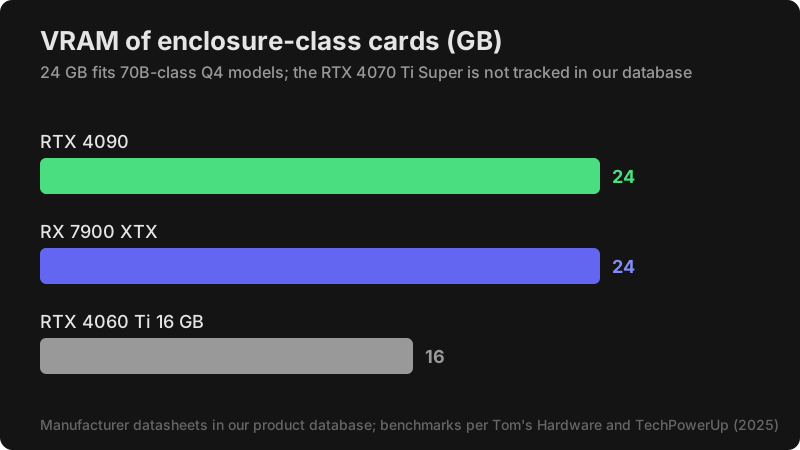
The RTX 4090 is the strongest verified choice for eGPU AI inference: 24 GB of VRAM, 1008 GB/s of memory bandwidth, and the highest tracked benchmark results among enclosure-class cards. The RTX 4070 Ti Super is the popular mid-range pick, and the RTX 4060 Ti 16 GB is the value pick.
| GPU | MSRP | VRAM | Bandwidth | Llama-3-8B Q4 (tok/s) | SDXL Turbo FP16 (img/min) |
|---|---|---|---|---|---|
| RTX 4090 | $1,599 | 24 GB | 1008 GB/s | 220 | 80 |
| RTX 4060 Ti 16 GB | $499 | 16 GB | 288 GB/s | 95 | 28 |
| RX 7900 XTX | $999 | 24 GB | 960 GB/s | 140 | 40 |
| RTX 4070 Ti Super | not tracked | not tracked | not tracked | not tracked | not tracked |
Specs per manufacturer datasheets in our product database; benchmarks per Tom's Hardware (4090, 7900 XTX) and TechPowerUp (4060 Ti), tested with llama.cpp Q4 and ComfyUI FP16 in 2025. The 4070 Ti Super is not tracked in our database, so its specs and performance are unverified here.
Why the RTX 4070 Ti Super is popular anyway
The RTX 4070 Ti Super is widely recommended for eGPU builds because it balances CUDA compatibility, VRAM capacity, and enclosure-friendly power draw. Our database does not track the card, so we link it for price checks without repeating specification claims we cannot verify.
→ Check current RTX 4070 Ti Super price on Amazon
Maximum performance: RTX 4090
Per the manufacturer datasheet, the RTX 4090 offers 24 GB of GDDR6X on a 384-bit bus, 16384 CUDA cores, and a 450 W TDP on the Ada Lovelace architecture. According to Tom's Hardware benchmark data, it delivers about 220 tokens per second on Llama-3-8B Q4 and 80 SDXL Turbo images per minute. Enclosure caveat: verify the enclosure's power delivery suits a 450 W card before buying.
→ Check current RTX 4090 price on Amazon
AMD option: Radeon RX 7900 XTX
Per the manufacturer datasheet, the RX 7900 XTX provides 24 GB of GDDR6, 960 GB/s of bandwidth, and 6144 stream processors on RDNA 3 at a $999 MSRP. According to Tom's Hardware data recorded here, it reaches about 140 tokens per second on Llama-3-8B Q4 via ROCm. Expect more setup friction than CUDA on some tools; ROCm support in our database is marked Linux-first.
Are eGPUs compatible with Macs?
No. Apple Silicon Macs do not support external GPUs over Thunderbolt; eGPU support ended with Intel Macs, and per Apple's current platform the upgrade path is a higher-tier Mac. For Mac-based AI, the tracked alternative is a Mac Studio with M3 Ultra: 96 GB of unified memory at a $3,999 MSRP, or the 256 GB configuration at $5,999, both with 819 GB/s of memory bandwidth and an 80-core GPU per our product database.
That memory capacity dwarfs any eGPU — a Mac Studio M3 Ultra can hold models that no single external graphics card can — but its GPU compute per watt is lower than a discrete NVIDIA card for some workloads. Choose by workload: huge-model inference favors unified memory; compute-heavy image generation favors discrete cards.
What about mini PCs with OCuLink instead of Thunderbolt?
Several tracked mini PCs expose an OCuLink PCIe port for external GPU expansion, which offers a more direct PCIe connection than a Thunderbolt-style link. This is the compact-system alternative to a classic eGPU enclosure.
| Mini PC | MSRP | Memory | Bandwidth | External GPU port |
|---|---|---|---|---|
| GMKtec EVO-X2 (Ryzen AI Max+ 395) | $2,199 | 128 GB LPDDR5X | 256 GB/s | OCuLink |
| MinisForum MS-S1 MAX | $2,399 | 128 GB LPDDR5X | 256 GB/s | OCuLink (USB4 V2) |
| AMD Ryzen AI Halo Dev Platform | $3,999 | 128 GB LPDDR5X | 256 GB/s | OCuLink |
Per manufacturer product pages recorded in our database, these Strix Halo machines pair 128 GB of unified memory with a Radeon 8060S iGPU (40 compute units, RDNA 3.5) and a 50 TOPS NPU. With 128 GB of memory they can run large models without any external card; OCuLink remains available for adding one.
How do you set up an eGPU for AI?
Setup is a numbered procedure: connect and authorize the enclosure, install drivers, install your AI software, then verify the card is actually being used before running real workloads.
- Connect the enclosure to your host and approve the external PCIe device when the system prompts you.
- Install the vendor GPU driver (NVIDIA driver for GeForce cards, AMD Adrenalin for Radeon).
- Install the CUDA Toolkit for NVIDIA cards, or ROCm on Linux for supported Radeon cards.
- Install your inference software: Ollama, LM Studio, llama.cpp, or ComfyUI.
- Verify detection by running
nvidia-smi(orrocm-smifor AMD) and confirming the external card is listed. - Run a short test generation and check the tool's logs to confirm compute runs on the external GPU, not the integrated one.
- On Linux, set
CUDA_VISIBLE_DEVICESif the host also has an internal GPU, and authorize the Thunderbolt device with your distribution's Thunderbolt management tool.
Can you use an eGPU for machine learning workloads?
Machine learning workloads split into two regimes over an external link. Inference — running a trained model — barely touches the link after weights load. Training and fine-tuning push gradients, activations, and optimizer state across the link every step, and that is where eGPUs fall behind internal slots.
For ML frameworks specifically: PyTorch and TensorFlow both detect an eGPU as a CUDA device once drivers are installed, so code that calls .to("cuda") works without changes. The bottleneck is not software compatibility but link throughput during backward passes.
| ML workload | Link sensitivity | eGPU viability |
|---|---|---|
| LLM inference (single-stream) | Low | Excellent — near-native after load |
| Image generation (Stable Diffusion, Flux) | Low–moderate | Good — slight latency on prompt transfer |
| Transfer learning / LoRA fine-tuning | Moderate | Fair — works but slower than internal |
| Full training (from scratch) | High | Poor — link saturates on backward pass |
| Distributed data-parallel (multi-eGPU) | Very high | Not viable — all-reduce over Thunderbolt |
If your ML work is inference-heavy, an eGPU is practical. If you train regularly, a desktop with a native PCIe x16 slot delivers far better throughput — see our deep learning GPU guide for training-optimized picks. For LLM-specific workloads, our local LLM GPU rankings cover VRAM tiers and token-generation benchmarks.
Is an eGPU cheaper than building a desktop?
Usually not. An enclosure plus GPU typically costs more than a desktop built around the same GPU, and the desktop avoids the bandwidth penalty entirely. The eGPU wins only when the laptop you already own is good enough to keep as the host.
We do not track enclosure prices in our database, so we avoid quoting them. For frame of reference from tracked data: the RTX 4060 Ti 16 GB card alone is $499 MSRP, and a cloud RTX 4090 rents for $0.34 per hour on RunPod per our cloud-instance database — renting may beat both eGPU and desktop for occasional workloads.
Should you buy an eGPU for AI in 2026?
Buy an eGPU if you need inference-class GPU power attached to a laptop you keep, and accept slower model loading. Skip the eGPU if you train, serve around the clock, or can tolerate a desktop — and consider tracked compact alternatives like Strix Halo mini PCs with OCuLink or a Mac Studio with large unified memory.
Best overall: RTX 4090 in a suitably powered enclosure. Best budget CUDA: RTX 4060 Ti 16 GB. Best value pick if the price fits: RTX 4070 Ti Super, specs unverified in our database.
→ Check current RTX 4070 Ti Super price on Amazon
Frequently Asked Questions
Do eGPUs work for LLM inference?
Yes. Once weights are in VRAM, token generation barely touches the external link, so an eGPU delivers close to native single-stream inference speed. Loading the model is the slow part.
Do eGPUs work for training?
Poorly. Training pushes large amounts of data across the link every step, so eGPU training throughput trails an internal slot significantly. Use a desktop or workstation for training.
Can I connect an eGPU to a Mac?
Not to Apple Silicon Macs. Current tracked Mac alternative: Mac Studio M3 Ultra with 96 GB of unified memory at a $3,999 MSRP; the 256 GB configuration lists at $5,999.
Which enclosure should I buy?
Enclosure models and prices are not tracked in our database, so we do not recommend specific chassis. Buy an enclosure whose power delivery covers your card's TDP — the RTX 4090 draws 450 W per the manufacturer datasheet — and whose cabling matches your host ports.
Sources
- Manufacturer datasheets recorded in the Compare AI Hardware product database (GPU and mini PC specifications, MSRP)
- Tom's Hardware GPU Benchmarks — RTX 4090, RX 7900 XTX benchmarks
- TechPowerUp GPU Reviews — RTX 4060 Ti benchmarks
- Cloud instance pricing recorded in the Compare AI Hardware cloud database (RunPod)
Compare AI Hardware participates in the Amazon Associates program and earns from qualifying purchases. Affiliate relationships do not influence these recommendations.