MacBook Pro vs PC Laptop for AI
Updated August 14, 2026. Platform specifications come from our hardware database of manufacturer datasheet values. We do not track laptop street prices; use the price-check links for current listings.
The MacBook Pro versus PC laptop question for AI is really a capacity-versus-speed question: Apple's unified memory holds models no discrete laptop GPU can, while NVIDIA-based PCs generate tokens faster for everything that fits in 24 GB. How they differ starts with memory architecture.
Best for maximum model size: MacBook Pro M4 Max with 128 GB of unified memory at 546 GB/s per our database, the largest GPU-accessible memory pool in any laptop we track. Best for CUDA and speed: RTX 5090-class PC laptops with 24 GB of GDDR7. Best for value capacity: AMD Strix Halo laptops, which reach the same 128 GB unified memory class on Windows at a lower tier of the market. This guide compares all three platforms on memory, software, speed, battery, and value.
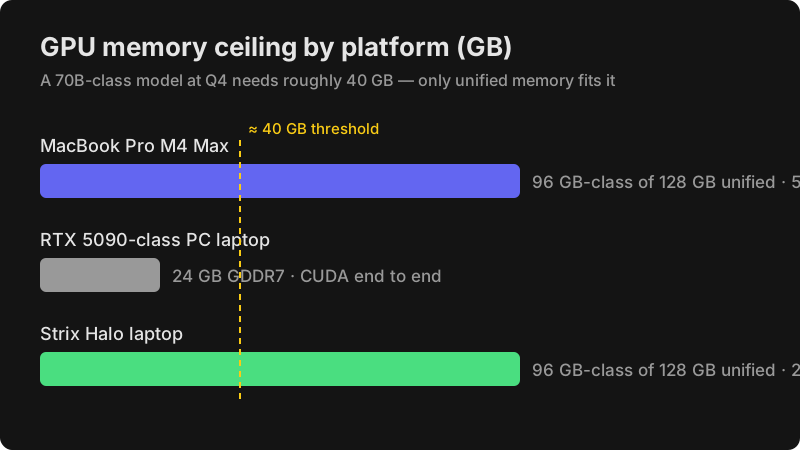
How does unified memory differ from a discrete laptop GPU?
Unified memory lets the GPU address the system's entire memory pool, while a discrete GPU is capped at its own VRAM, and that single architectural difference sets what each platform can run.
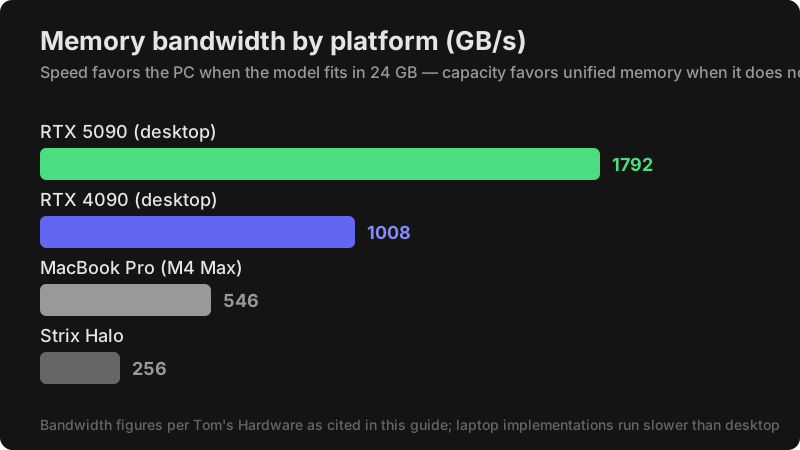
Per our specification database, the M4 Max MacBook Pro reaches 128 GB of unified memory with 546 GB/s of bandwidth and 40 GPU cores. AMD's Strix Halo platform matches the 128 GB capacity at 256 GB/s with its Radeon 8060S graphics. An RTX 5090 laptop GPU carries 24 GB of fast GDDR7, which no configuration raises. The consequence: a 70B-class model at Q4, needing roughly 40 GB, fits only on the unified memory platforms, while models through the 30B class run faster on the NVIDIA machine.
| Metric | MacBook Pro M4 Max | RTX 5090-class PC | Strix Halo laptop |
|---|---|---|---|
| GPU memory type | Unified | Discrete GDDR7 | Unified |
| GPU memory ceiling | 96 GB-class of 128 GB | 24 GB | 96 GB-class of 128 GB |
| Bandwidth | 546 GB/s | GDDR7 class | 256 GB/s |
| 70B-class at Q4 | Fits with headroom | Does not fit | Fits with headroom |
| Software path | Metal, MLX, CoreML, llama.cpp | CUDA end to end | ROCm, Vulkan, DirectML |
Attribution: Apple figures come from the company's specification pages as recorded in our database, AMD figures from AMD's Ryzen AI Max+ 395 product page, and NVIDIA laptop GPU class from our GPU database entries for the desktop architecture family.
Which AI software runs on each laptop platform?
For inference, all three platforms work well through llama.cpp-based tools; for training, CUDA is the only complete option.
MacBooks run MLX, Apple's machine learning framework, natively alongside CoreML and llama.cpp through Metal, and Ollama-style local serving tools support Apple Silicon directly. Strix Halo laptops run ROCm, Vulkan, and DirectML paths on Windows, with the Vulkan backend of ComfyUI and llama.cpp as the practical routes. NVIDIA laptops run the full CUDA stack, including PyTorch training, vLLM serving, and every CUDA-native tool released for AI work. Intel Arc laptops, the fourth platform, handle background productivity AI through OpenVINO and DirectML but serve models poorly, since per our database their shared memory runs at 136.5 GB/s on the Core Ultra 7 258V.
The training question is decisive: LoRA fine-tuning works on Apple Silicon through MLX and on AMD through ROCm, but PyTorch with CUDA remains the industry-standard training path. Buyers who train on the move buy NVIDIA.
Which platform generates tokens faster?
For models that fit within 24 GB, NVIDIA laptops generate tokens fastest, and the seeded desktop benchmarks frame each platform's ceiling.
According to Tom's Hardware, the desktop RTX 5090 runs Llama-3-8B at Q4 at 320 tokens per second on 1,792 GB/s of bandwidth, and the RTX 4090 manages 220 tokens per second on 1,008 GB/s. Laptop implementations run slower, but the ordering by bandwidth holds: NVIDIA's discrete GDDR7 leads, Apple's 546 GB/s unified pool follows, and Strix Halo's 256 GB/s platform comes next. For 70B-class models the ranking flips by availability rather than speed, because only the unified memory platforms can load them at Q4 at all. Speed favors the PC when the model fits; capacity favors Apple and AMD when it does not.
Why is Strix Halo the value alternative to the MacBook Pro?
Strix Halo laptops deliver the same 128 GB unified memory class as the MacBook Pro on Windows, at a lower tier of the market, which makes them the value pick for capacity-first buyers.
Per our database, the platform pairs 16 Zen 5 CPU cores with 40 RDNA compute units of Radeon 8060S graphics, a 50 TOPS NPU, and up to 128 GB of LPDDR5X at 256 GB/s. Two current machines anchor the class: the HP ZBook Ultra G1a 128 GB with AMD PRO security for enterprise buyers, and its 32 GB Max 390 sibling for entry-level unified memory. The ASUS ROG Flow Z13 covers the same chips in tablet form. The trade-offs against Apple are bandwidth, roughly half of the M4 Max's 546 GB/s, and software polish, since ROCm and Vulkan paths need more configuration than Metal and MLX.
Check current pricing for the HP ZBook Ultra G1a 128 GB →, the ZBook Ultra G1a 32 GB →, and the ASUS ROG Flow Z13 32 GB →.
Why is Intel Arc the productivity trap for AI laptops?
Intel's laptop platform markets combined TOPS figures, but its architecture serves background features rather than models, and the database numbers explain the gap.
Per our records, the Core Ultra 7 258V carries a 47 TOPS NPU with 32 GB of shared LPDDR5X at 136.5 GB/s and 8 Xe2 graphics cores, running OpenVINO, DirectML, and IPEX. There is no CUDA, the shared memory pool is the slowest of the four platforms, and the LLM ecosystem's default tooling targets other hardware. These laptops are good buys for efficiency and built-in AI features; they are not model-serving machines, and no TOPS figure changes that.
Can MacBook Pros run AI on battery?
Yes, and that is a genuine Apple Silicon advantage: unified-memory MacBooks keep serving models unplugged at close to full speed, while Windows gaming laptops throttle hard on battery.
The practical value shows in field work: research, demos, and long inference sessions away from power stay usable on Apple hardware. Strix Halo laptops improve on gaming laptops here but still throttle more than MacBooks under sustained unplugged load. For buyers whose AI work happens in meeting rooms and on flights rather than at a desk, this advantage weighs heavily.
Can you train models on a laptop?
Light fine-tuning works on all three platforms, but serious training belongs on desktops, and our workstation database shows what that tier looks like.
LoRA fine-tuning of small models fits within 24 GB of VRAM on an RTX 5090-class laptop, which is the practical training pick of the three platforms thanks to CUDA. On unified memory machines, MLX and ROCm fine-tuning works with more friction. For daily training, our tracked RTX 5090 desktop build at a $4,000 MSRP with 32 GB of VRAM and 1,792 GB/s of bandwidth, or the Mac Studio with up to 512 GB of unified memory for giant-model experimentation, outperform every laptop. Laptops trade sustained thermal capacity for portability, and training is the workload that exposes the trade most.
Which platform should each type of buyer choose?
The decision sorts cleanly by workload, and the recommendations below map each buyer type to a platform.
- Maximum local model size: MacBook Pro M4 Max 128 GB, the only laptop we track with 546 GB/s over a 96 GB-class GPU allocation.
- CUDA training and tooling on the move: RTX 5090-class PC laptops with 24 GB of GDDR7.
- Capacity per dollar: Strix Halo laptops, reaching the 128 GB unified class on Windows below Apple's price tier.
- Creative work integrated with macOS apps: MacBook Pro, whose Metal path connects diffusion models to pro applications.
- Productivity AI and battery life only: Intel Core Ultra laptops, with no expectation of running models.
Every buyer type above also has a desktop alternative in our guides when portability stops mattering.
Who should NOT buy a MacBook Pro for AI?
Buyers who train daily and buyers whose models fit in 24 GB should not buy a MacBook Pro for AI work alone.
Training throughput belongs to CUDA machines, and for models that fit in a 24 GB GPU, the RTX 5090-class laptops generate tokens and images faster at a comparable tier of the market. The MacBook Pro is the correct purchase when model capacity, battery inference, or the macOS workflow is the requirement, not when raw speed is.
How did we compare these platforms?
We compared only database-verified specifications: Apple's unified memory capacity and bandwidth from its specification pages, AMD's Strix Halo platform values from its product page, Intel's platform values from its processor database entries, and NVIDIA desktop architecture anchors from our GPU database. Speed anchors come from June 2025 benchmark records at Tom's Hardware.
We report no street prices because laptop listings move constantly; every linked machine carries a price-check link instead. Affiliate relationships do not influence this comparison.
Frequently Asked Questions
These are the questions buyers ask most about MacBook Pro versus PC laptops for AI.
Can a MacBook Pro run 70B-class models?
Yes, at Q4 quantization. The M4 Max 128 GB configuration gives the GPU a 96 GB-class allocation at 546 GB/s per our database, which holds those models with context headroom.
Is the RTX 5090 laptop better for LLMs?
For models that fit in 24 GB, yes, it is faster thanks to GDDR7 memory and CUDA. For 70B-class models, it cannot load them, while the unified memory platforms can.
Is Strix Halo as good as Apple Silicon?
For capacity, yes: both reach 128 GB of unified memory. Apple leads on bandwidth at 546 GB/s versus 256 GB/s per our database, and on software polish through Metal and MLX.
Do Intel Arc laptops run local LLMs?
Slowly, through OpenVINO and DirectML on shared memory at 136.5 GB/s. They suit productivity AI features rather than model serving.
Can you fine-tune models on a MacBook Pro?
LoRA fine-tuning works through MLX for models that fit in the unified pool. Full training pipelines require CUDA hardware, so heavy trainers should buy NVIDIA.
Sources
Specifications are manufacturer datasheet values from our hardware database; benchmark anchors are from the third-party sources below.
- Apple M4 Max Specifications — https://support.apple.com/kb/SP1127
- Apple Mac mini Technical Specifications — https://support.apple.com/kb/SP1128
- AMD Ryzen AI Max+ 395 Product Page — https://www.amd.com/en/products/processors/desktops/ryzen/ryzen-ai-halo/ryzen-ai-max-plus-395.html
- Intel ARK Processor Database — https://ark.intel.com
- Tom's Hardware GPU Benchmarks 2025 — https://www.tomshardware.com/pc-components/gpus
- TechPowerUp GPU Reviews — https://www.techpowerup.com/reviews/
Related reading: our full AI laptop ranking, the laptop guide for local LLMs, and the Mac Studio versus PC comparison.
Disclosure: CompareAIHardware.com participates in the Amazon Associates program and earns from qualifying purchases through links on this page. Affiliate relationships do not influence our recommendations.
CompareAIHardware.com participates in the Amazon Associates program. As an Amazon Associate, we earn from qualifying purchases. This guide reflects our independent analysis — affiliate relationships do not influence our recommendations.