Multi-GPU for AI: When Two GPUs Beat One
Updated: August 14, 2026
When do two GPUs beat one? Exactly when you need combined VRAM that no single card provides, or when your workload runs as independent parallel jobs. For single-stream LLM inference, one bigger card wins. Modern multi-GPU is SLI-free: the cards cooperate through software, not a gaming bridge.
Verdict: Go multi-GPU for 48 GB+ of combined VRAM (tracked examples: a dual RTX 4090 build at a $6,500 MSRP, or dual RTX 6000 Ada workstations) or for training throughput. Stay single-GPU — RTX 5090 at $1,999 MSRP — for simplicity, latency, and power efficiency. No current GeForce card supports NVLink.
When does a second GPU actually help?
A second GPU helps in two situations: the model must split across cards because it exceeds one card's VRAM, or your jobs are independent and can run one per card. It does not speed up a single interactive LLM conversation whose model already fits.
The decision rests on one question: is your bottleneck capacity or latency? Capacity bottlenecks — models that do not fit, queues of independent jobs, training runs that need more compute hours — are what second GPUs solve. Latency bottlenecks in single-stream chat are not; splitting one model across cards adds per-token coordination that a single bigger card never pays.
- VRAM pooling (helps): two RTX 4090 cards combine for 48 GB, enough for 70B-class models at 4-bit quantization, per our workstation database.
- Data-parallel training (helps): each card trains a full replica on different data; throughput scales well.
- Batch inference (helps): requests distribute one per card with no inter-GPU traffic.
- Embarrassingly parallel jobs (helps): Whisper transcriptions, image batches, dataset processing.
- Single-stream inference on a fitting model (does not help): splitting one model's layers across cards adds communication per token; one bigger card is faster.
Do modern GeForce cards support NVLink?
No. According to the configuration data in our product database, the RTX 4090 does not support NVLink, RTX 5090 workstations record no NVLink, and Blackwell workstation GPUs (RTX Pro 6000) drop it as well. The last widely-used GeForce card with NVLink bridge support was the RTX 3090.
Among tracked professional cards, the RTX 6000 Ada does support NVLink bridges — our database records dual-RTX 6000 Ada workstations with NVLink plus PCIe peer-to-peer. Without NVLink, multi-GPU communication runs over PCIe, which favors pipeline and data parallelism over tensor parallelism.
Pipeline parallelism or tensor parallelism?
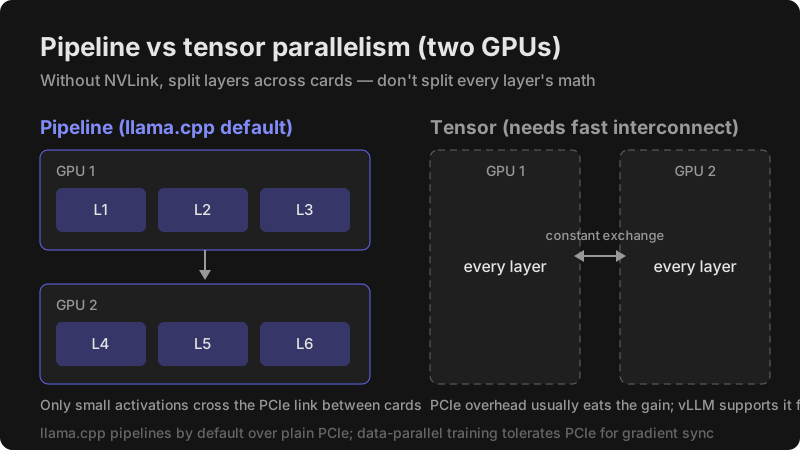
Pipeline parallelism splits a model by layers across cards and works well over plain PCIe; tensor parallelism splits each layer's math across cards and needs high inter-GPU bandwidth to pay off. For home and small-lab builds without NVLink, pipeline parallelism is the default choice.
- Pipeline parallelism: card one runs the first layers, card two the rest; only small activations cross between cards. This is llama.cpp's default multi-GPU behavior and the practical choice for consumer builds.
- Tensor parallelism: both cards cooperate on every layer, exchanging data constantly; without NVLink the PCIe overhead usually eats the gain. vLLM supports it for serving throughput.
- Data parallelism (training): each card holds the full model on different data batches; gradients sync periodically, which tolerates PCIe.
How do you build a multi-GPU AI workstation?
The build is a numbered procedure: pick a workload strategy first, then platform, power, and cooling, then software configuration. The tracked reference build in our database is a dual RTX 4090 rig: Threadripper 7980X, 128 GB of DDR5 ECC, a 1600 W power supply, two PCIe x16 slots on a PCIe 5.0 platform, water cooling recommended, with an estimated peak draw of 1200 W.
- Confirm your workload actually benefits: model does not fit one card, training throughput, or independent parallel jobs. Otherwise stop — one card is simpler and faster.
- Choose two identical GPUs when possible; matched memory sizes keep layer-splitting balanced.
- Pick a platform whose CPU supplies enough PCIe lanes to run both card slots at full width — the tracked dual-GPU builds use workstation-class Threadripper CPUs for exactly this reason. Check each slot's electrical width in the board manual, not just its physical size.
- Size the power supply for both cards' TDP plus the rest of the system; the tracked dual 4090 build uses 1600 W against an estimated 1200 W peak.
- Plan cooling with physical spacing between cards; the tracked build recommends water cooling, and open-air dual-GPU stacks need strong case airflow.
- Install the OS and vendor drivers, then verify both cards appear with
nvidia-smi. - Configure your AI software for two GPUs (next section) and run a test generation.
- Measure: tokens per second and time-to-first-token versus single-GPU, so you know what the second card actually bought.
How do you configure AI software for two GPUs?
Point your tool at both cards and choose a split strategy: layer split for fitting large models, one-instance-per-card for parallel jobs, or a distributed training launcher for fine-tuning.
- llama.cpp: run with
-sm layerto split layers across both cards, or-sm rowfor row-wise tensor split;-tstunes the allocation ratio between unequal cards. - Ollama: distributes a model across detected GPUs automatically when it does not fit on one.
- vLLM: set its tensor-parallel and pipeline-parallel options to match your card count for serving.
- PyTorch training: use DistributedDataParallel (DDP) for data parallelism; DeepSpeed's ZeRO sharding extends it to larger models.
- Image generation: run one ComfyUI or WebUI instance per GPU and distribute jobs externally.
How should PCIe lanes be allocated between two GPUs?
Both cards should run at the widest electrical link your platform allows, and that is a CPU-and-motherboard question, not a GPU question. We keep this guidance qualitative because our database does not track per-platform lane maps — check the motherboard manual's slot table before buying anything.
- Consumer desktop platforms: CPU lane budgets are limited, so populating two card slots often narrows one or both links; the manual states each slot's electrical width per configuration.
- Workstation platforms: the tracked dual-GPU builds use Threadripper-class CPUs precisely because they feed multiple card slots at full width on a PCIe 5.0 platform.
- What actually suffers: narrow links hurt model loading and tensor-parallel traffic; layer-split inference and data-parallel training tolerate them far better.
- Verification step: after building, confirm each card's negotiated link width and generation with
nvidia-smibefore benchmarking.
How do you keep two GPUs cool?
Two high-TDP cards in adjacent slots heat each other, so spacing and case airflow are part of the build, not an afterthought. The tracked dual RTX 4090 reference build recommends water cooling; professional dual-GPU workstations from System76 use professional air cooling in engineered chassis.
Practical rules: leave an empty slot between cards where the board allows, prefer strong front-to-back case airflow, and watch both cards' temperatures under sustained inference load. If the top card throttles while the bottom one runs cool, the fix is spacing or airflow, not software.
Dust maintenance matters twice as much with two cards: stacked coolers collect dust faster and run warmer than single-GPU systems on the same schedule. Clean filters and heatsinks on a regular cadence, especially in liquid-cooled dual-GPU builds where radiator airflow carries both cards' heat.
How much does a multi-GPU setup cost?
Tracked multi-GPU systems range from a $6,500 DIY dual RTX 4090 build to an $18,000 dual RTX 6000 Ada workstation with NVLink — against a $1,999 single RTX 5090 card. You are buying VRAM capacity and training throughput, not per-token speed.
| Tracked system | MSRP | Combined VRAM | Interconnect | Notes |
|---|---|---|---|---|
| DIY dual RTX 4090 | $6,500 | 48 GB GDDR6X | PCIe peer-to-peer | Threadripper 7980X, 1600 W PSU |
| ArsenalPC dual RTX 5090 | $11,999 | 64 GB GDDR7 | PCIe | Liquid cooled, 3-year warranty |
| System76 dual RTX 6000 Ada | $18,000 | 96 GB GDDR6 | NVLink bridges | Linux-first, ECC system memory |
| HP Z8 Fury, RTX 6000 Ada | tracked (workstation) | 48 GB per card | NVLink supported | Enterprise support |
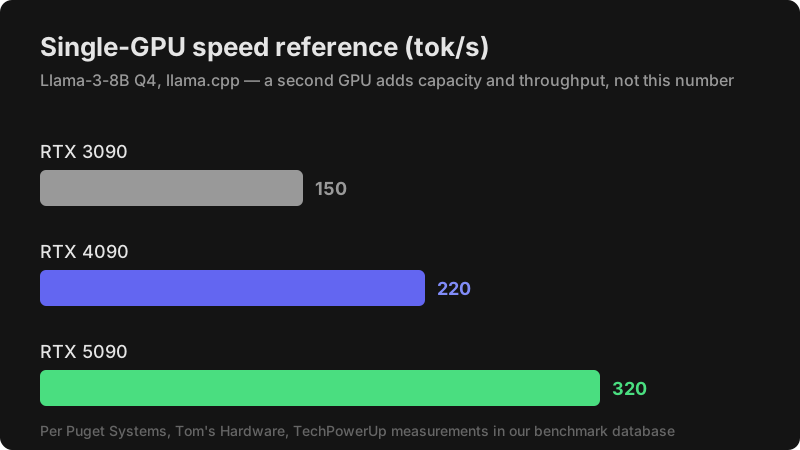
Single-GPU speed reference from our benchmark database (llama.cpp, Llama-3-8B Q4): the RTX 3090 records 150 tokens per second, the RTX 4090 records 220, and the RTX 5090 records 320, per Puget Systems, Tom's Hardware, and TechPowerUp measurements recorded here.
Should you rent multi-GPU in the cloud instead?
Renting wins for occasional training bursts; buying wins for daily inference. Our cloud database records multi-GPU rental rates including four RTX 4090 cards at $1.20 per hour on Vast.ai and eight RTX 3090 cards at $1.80 per hour, alongside single RTX 4090 rentals at $0.34 per hour on RunPod.
Rule of thumb: if your multi-GPU need is measured in a few hundred hours, cloud rental avoids the $6,500+ hardware outlay, the 1200 W power draw, and the cooling engineering. If hardware runs daily, ownership amortizes quickly and avoids recurring rental cost.
Two practical notes from the rental data. First, matched-card cloud nodes remove the compatibility work entirely — rented multi-GPU instances arrive pre-configured, which makes them a good way to test whether a two-card workflow actually helps before buying hardware. Second, rental rates fluctuate with market supply; treat the recorded prices as a snapshot and re-check current rates before budgeting a long training run.
Verdict: should you go multi-GPU?
Go multi-GPU when one card's VRAM is your hard limit or training throughput pays for itself; stay single-GPU otherwise. The tracked decision points: at a $1,999 MSRP, one RTX 5090 with 32 GB is the simple answer; near $6,500, the dual RTX 4090 reference build doubles capacity to 48 GB; professional budgets reach 96 GB per pair with NVLink on RTX 6000 Ada.
Best used-card pairing for VRAM per dollar: two used RTX 3090 cards (24 GB each, 936 GB/s each per manufacturer datasheet).
→ Check current RTX 3090 price on Amazon
Prefer single-GPU simplicity? The RTX 5090 records the fastest tracked inference in our database.
→ Check current RTX 5090 price on Amazon
Building a PCIe-only dual rig? The RTX 4090 records 220 tokens per second on Llama-3-8B Q4 with no NVLink dependency.
→ Check current RTX 4090 price on Amazon
Frequently Asked Questions
Does SLI help AI workloads?
No. SLI is a gaming frame-rendering technology; AI frameworks ignore it. Multi-GPU AI uses software parallelism — layer splits, tensor parallelism, or data parallelism — over PCIe or NVLink.
Can you mix different GPU models?
You can, but matched cards are simpler: equal VRAM keeps layer splits balanced, and identical architectures avoid driver quirks. With unequal cards, llama.cpp's tensor-split ratio option compensates.
Do two GPUs double LLM inference speed?
No. For a single request, splitting one model adds per-token communication. The wins are capacity (larger models fit) and throughput (parallel requests or jobs), not single-stream latency.
What PSU do two GPUs need?
Sum both cards' TDP plus roughly the rest of the system: the tracked dual RTX 4090 build (900 W of GPU TDP) uses a 1600 W supply with an estimated 1200 W peak. Match your cards' TDP to that pattern.
Do two GPUs merge into one VRAM pool?
No — each card keeps its own memory, and software treats them as separate devices. Layer-split inference makes the pair behave like one big pool for a single model, but total capacity is still bounded by the sum, and any one layer must fit on one card.
Can you mix PCIe generations across two GPUs?
Yes — cards negotiate down to the platform's generation, and inference workloads tolerate the difference well because steady-state generation barely uses the link. Check each card's negotiated link with nvidia-smi if you suspect a slot is running narrower than expected.
Sources
- Workstation configurations recorded in the Compare AI Hardware database (DIY dual 4090, ArsenalPC MES2X, System76 Thelio Major, HP Z8 Fury)
- Manufacturer datasheets recorded in the Compare AI Hardware product database (RTX 3090, 4090, 5090, RTX 6000 Ada specifications and MSRP)
- Puget Systems Hardware Testing — RTX 3090 benchmark
- Tom's Hardware GPU Benchmarks — RTX 4090, 5090 benchmarks
- TechPowerUp GPU Reviews — RTX 5090 benchmark
- Cloud rental rates recorded in the Compare AI Hardware cloud database (Vast.ai, RunPod)
Compare AI Hardware participates in the Amazon Associates program and earns from qualifying purchases. Affiliate relationships do not influence these recommendations.